Settings, integrations and billing
Your business details, what connects to what, your own subscription, and what happens if a payment for it fails.
Settings is where the details the rest of Mist reads from live. It is worth ten minutes early on, because the AI, your invoices and your booking page all quote from here.
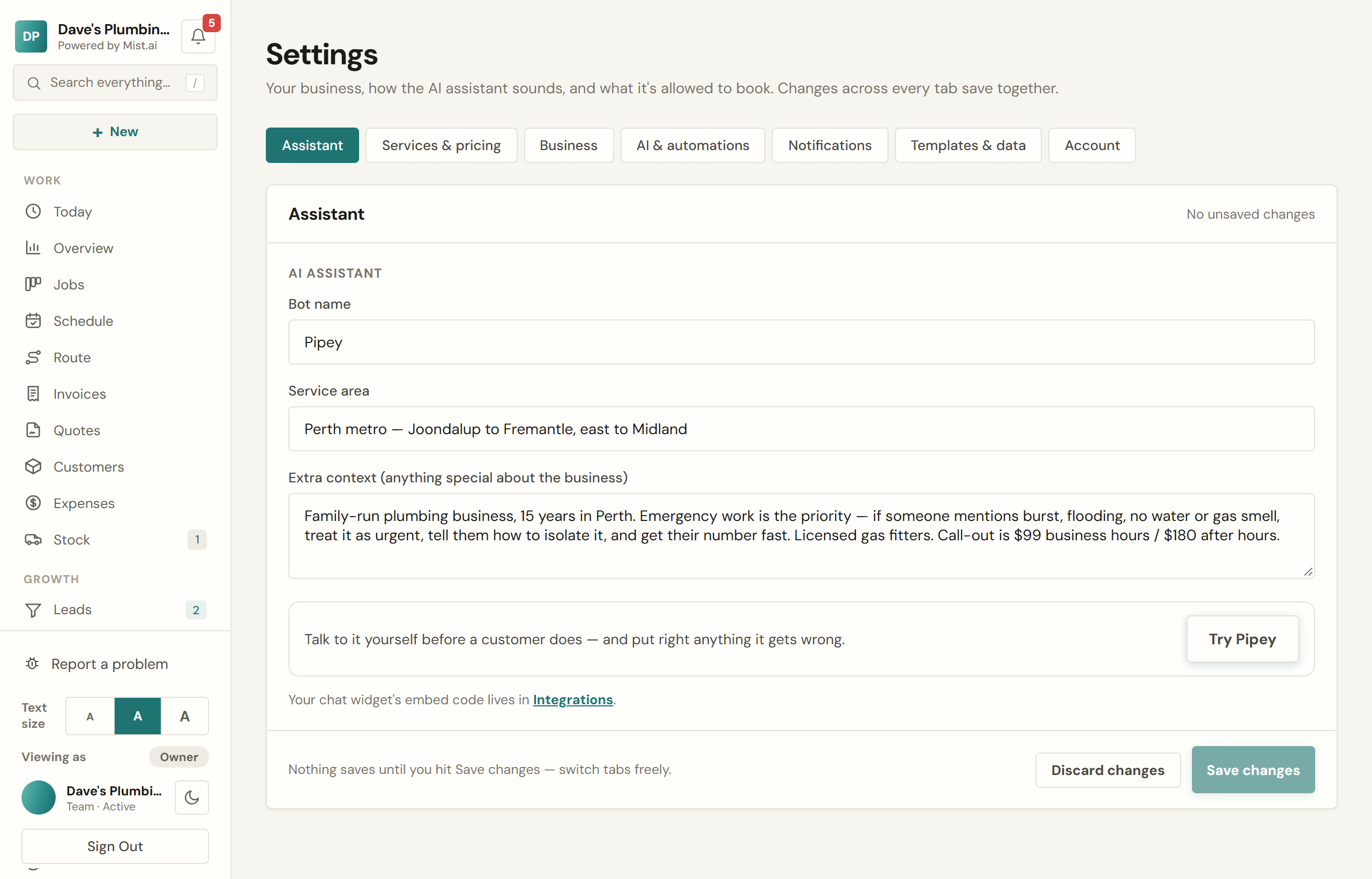
Settings is in groups, named for what you are doing. Find a setting, at the top, finds one by its words, or by a word you would use for it, like bank, hours, logo or password. Boxes you type in wait for Save changes; switches save the moment you tap them, and say so.
Worth getting right
- Business. Name, ABN, address, the states you work in, the contact details customers see, your licences, insurance and warranty, your logo and brand colour, and your trade's starter set.
- Quotes & invoices. Your services and prices: the AI quotes from these and nothing else. Your call-out fee and hourly rate, the price book, payment terms and bank details, Take payment, the notes and terms on every quote and invoice, how customers accept a quote, the reminders and receipts that go by themselves, and your templates.
- Booking & jobs. Your hours, which are what the AI offers customers; closed dates; Booking the work: who chooses the time for the work, the times you give customers, and the day-before reminder; what customers may change online; your booking page; your Google review link and the review requests; and job templates, checklists and job forms.
- Texts & alerts. Who on your team hears about what, by email or text (see Alerts: who hears what), the reports that come to you, and your phone line.
- Assistant. Its name, the area you cover, anything special about the business it should know, How it talks to customers, its FAQs, and what it does by itself.
- Your data. Bring records across from another system, and take a copy out.
- Sign-in & security and Display: your login and where you are signed in; and the text size and light or dark, on this device only.
Someone you let change the business's settings can open Settings too, apart from Sign-in & security. A few things stay yours alone, and they see them as Owner only or not at all: your contact details, bank details, billing address and labour cost; who hears what, where alerts go and the Business number; how the assistant talks, its extra context and trying it; and bringing records across. Someone you let change closed dates sees Closed dates, Customer changes and Booking the work. Everyone, whatever they may do, has Settings → Display: the text size and light or dark on their own device. Connections and Billing are only ever yours.
Closed dates
Going away, or a rain day? Add the dates in Settings → Booking & jobs → Closed dates (there is a button for Christmas to New Year). From the first closed day:
- The chat on your website tells customers you are closed and when you are back, and still takes their details. You can put that line in your own words.
- Those days are kept off your online booking page.
- Automatic quote follow-ups and invoice reminders wait until you are back, then each goes once.
- Nothing already booked is cancelled. Jobs booked in those days are listed for you to move, or keep.
Open early ends a closure, and customers stop being told you are closed. Only you, or someone you let change closed dates and what customers may change online, can set closed dates, because they change what every customer is told.
Your trade's starter set
Settings → Business → Your trade shows the trade your account is set up for and what its starter set gave you: services with their prices, job templates, checklists, job forms and the questions your chat answers. You can add another trade's set beside it. The screen lists what it adds and what you already have, and nothing you have is changed or removed; adding a set never changes your trade. Specialist sets are set up by our team. Only you, or someone you let change the business's settings, can add a set.
Connections
- Stripe so customers can pay by card. Money goes to your bank.
- Xero Pro and up — an emailed invoice is pushed across as an approved invoice with the same number. Payments reconcile through your own bank feed; Mist never writes payments into your books.
- Google Calendar Pro and up so scheduled jobs appear in the calendar you already look at.
Your Business number
Your Business number is a mobile number of your own. Calls you miss on your existing phones forward to it. The caller hears a short message, can leave a voice message, and gets a text back from your Business number. Voice messages land in your Inbox written out, and customers’ texts to your Business number land there too. You ask for one in Settings → Texts & alerts. Only the account owner can, because it is registered to the business and charged to its card.
Australian rules require every business number to be registered to the business that uses it. So you send your business name, ABN and address as they appear on your ABN record, with one document showing your business address: a utility bill, a tax notice from the ATO, a rent receipt, or your ASIC extract. With anything but the ASIC extract, add your ASIC company extract or ABN record too. Your details are then being checked — usually 1–3 business days — and we email you as soon as they are approved.
Once you are approved, you pick your number from a list, on the web. It is $29 a month on your bill, starting the day your number goes live, or the day your free trial ends if that is later. Nothing is charged until then. Add-ons need a monthly plan.
One step is left: on each phone the business answers from, set your phone company’s call forwarding for calls you don’t answer to your Business number. Then let a call to your mobile ring out: it should go to Mist. The Set up Mist card can show the forwarded call arriving.
Moving in from something else
Customers, jobs and invoices can be imported from a CSV — exports from ServiceM8, Tradify, Jobber or a spreadsheet all work. Old invoices come in with their history intact, and unpaid ones are deliberately left alone by the auto-chaser so nobody gets a surprise reminder about a bill from last year.
Your subscription
Billing shows your plan, what is included, and your next payment. You move between Starter, Pro and Team, or between monthly and yearly, yourself from Billing on the web portal, without ringing anyone: a bigger plan starts straight away, and a smaller plan or monthly billing starts at your next bill. Yearly billing waits until your add-ons, paid staff logins included, are switched off. You can cancel from Billing on the web or in the app. Cancelling keeps your access until the end of the period you have paid for.
Moving to yearly starts straight away and, outside your free trial, is charged that day. Change one thing at a time: a smaller plan and yearly billing, or a bigger plan and monthly billing, are two changes. Moving to a plan with fewer staff logins than you use asks first, and the extra people become paid logins; Starter has no staff logins, so remove your staff on Team before moving to it.
Your free trial is 7 days from when your card goes in, and Billing shows when it ends and the date of your first bill. Where your plan has a setup fee, it is $299, charged with your first bill and given back as credit off your first 8 plan bills (on yearly billing, all of it on the first). Billing shows how much has come back.
Billing also shows the texts you have used this month. Ran out? Top up there buys a pack of texts whose credits never expire. If your business has AI window pictures, the picture packs are on the same card (see Measure pads and window pictures). Top-ups are bought on the web, not in the app, and only by the account owner.
Refer a business
Know a tradie who’d use Mist? Refer a business, under Account in the menu on the web, has your own link, a QR code they can scan off your screen, and a ready-made message to send. When a business you refer signs up with your link and pays for its first month, you both get a month of your own plan free, as credit. No cap: every one counts.
Once they have paid, your month usually lands within the hour, as credit applied to your next bill. It never pays out as cash. The page keeps a tally of the businesses you have referred, the free months you have earned, and who is still waiting for their first payment.
If a plan payment fails
If a payment for your Mist plan does not go through, we email you straight away. It is usually something small, like an expired card, and we try the card again on our own. Your account keeps working for 2 days after that email.
If the payment still has not gone through after those 2 days, your account becomes read-only until it does:
- You can still sign in and see everything.
- The AI assistant, texts and new work pause.
- The invoice and quote links you have sent customers stop opening.
The moment the payment goes through, everything switches straight back on. Nothing is deleted.
To update your card, sign in on the website and open Billing (the Update your card button in that email takes you there). Under Payment method, press Manage subscription, then press Update payment method on your plan (or Pay failed amount, if that shows) and choose your card. Your waiting bill is paid straight away. If you have asked to cancel, it is the Stripe link under Resume subscription instead.
Getting your data out
Settings → Your data → Data export gives you CSVs of leads, jobs, customers, invoices, expenses and mileage. Timesheets have their own: Timesheets → Export CSV, a week at a time. It is your data and there is a button for it.