Invoices and getting paid
Raising an invoice, taking payment, and the chasing that happens without you.
An invoice in Mist is a page the customer opens and pays, not a PDF they have to find again. It carries your logo, your ABN, your bank details and your payment terms.
Raising one
From a finished job it is one tap and the customer, the address and the work are already filled in. A price the customer was sent is the price they are billed — quoted including GST, no GST is added again — and a deposit they paid when they accepted comes off, so they are only asked for the balance. From scratch, add lines and it totals with GST. Numbers are sequential and never reused, so INV-0042 is INV-0042 forever, even if something is deleted.
Its due date comes from its payment terms, worked out the first time you send it and then fixed, so sending it again or changing your terms later never moves it. Mist reads terms like Due on receipt, Net 30, 30 days EOM, end of next month or 20th of the following month, or a date. Terms it cannot read are printed as you wrote them, and the reminders count at least 14 days from when you sent it.
Getting paid
- Card online. With Stripe connected, the invoice page has a Pay button and the money lands in your bank — not ours — less Stripe's card fee and Mist's 0.5%. Mist takes nothing from tips. Your business name is on your customer's card statement. Stripe pays card money out to your bank 7 days after the payment (your bank can take a day or so more to show it), so a refund or dispute in the first days can come out of it. Stripe checks your business before it takes the first card. Until it says yes, your customers are shown bank transfer only — no card button on invoices and quotes, and no code at the end of a job — and the portal says Stripe hasn't switched card payments on yet. Connections → Stripe shows where it's up to.
- Bank transfer. Your account details and a reference are printed on the invoice and the PDF. The email and text you send it with say what is still to pay, less anything already paid, and on an invoice paid in stages, the stage due now.
- Scan to pay. A QR code you can hold up on site, from the job or from the invoice, and on the PDF itself.
- Deposits and instalments. Split the invoice into stages — each is payable on its own, and the invoice only shows paid when every stage has cleared.
- Cash and EFT. Record what you were paid by hand; the balance updates and the chasing stops. On an invoice paid in stages, it fills the stages in order, oldest first, and the pay page then asks only for what is still owed.
- Recorded by mistake? The red × beside a payment you recorded takes it off again. A card payment taken through Mist cannot be taken off: refund it instead (below).
Customers can get a receipt when a payment lands: switch on Tell customers when a payment lands in Settings → Quotes & invoices. Choose how it goes (email, text or both), and who sends it: Mist, or MYOB (your bookkeeper sends them), or both. With MYOB chosen, Mist sends none. The Texts page says when a receipt goes.
Taking payment on the job
Finished, and the customer is standing there? Press Take payment on the job and your phone shows a full-screen code. They scan it with their own phone and pay on your invoice page, by card, Apple Pay or Google Pay.
- No invoice yet? One is made from the job — its accepted quote, or its service at the quoted price — and you check the amount before anything is made. A job whose quote is paid in stages is never invoiced whole: each stage is paid on the quote and gets its own tax invoice. A draft invoice is shown to you first too, and going on issues it.
- It asks for what is owed, not the total. On an invoice paid in stages, it asks for the stage that is due.
- It tells you when they have paid. The screen turns into Paid ✓ by itself when the money lands, and closes only with its own button, so a bumped phone does not lose it. After fifteen minutes it stops checking, and says so.
It needs card payments switched on — Stripe connected and set up, under Connections; until then the screen says so plainly and offers the invoice link to send instead. Only you, or someone you let record payments, can use it; never the bookkeeper's read-only login. You can switch it off in Settings → Quotes & invoices → Getting paid.
Chasing, without you doing it
An unpaid invoice past its due date is reminded at 3, 7 and 14 days, then stops — three reminders, not an endless drip. The last one goes by text if that is the better channel. Recording any payment stops it immediately. Sending an invoice again does not restart its due date.
On an invoice whose stages fall due when the work is booked or done, Mist chases only the stage that is due, counted from the day it fell due. And a payment never closes a job that is not finished: a job booked for next week stays booked when its invoice is paid, and moves to paid when you mark it complete.
Money you are owed
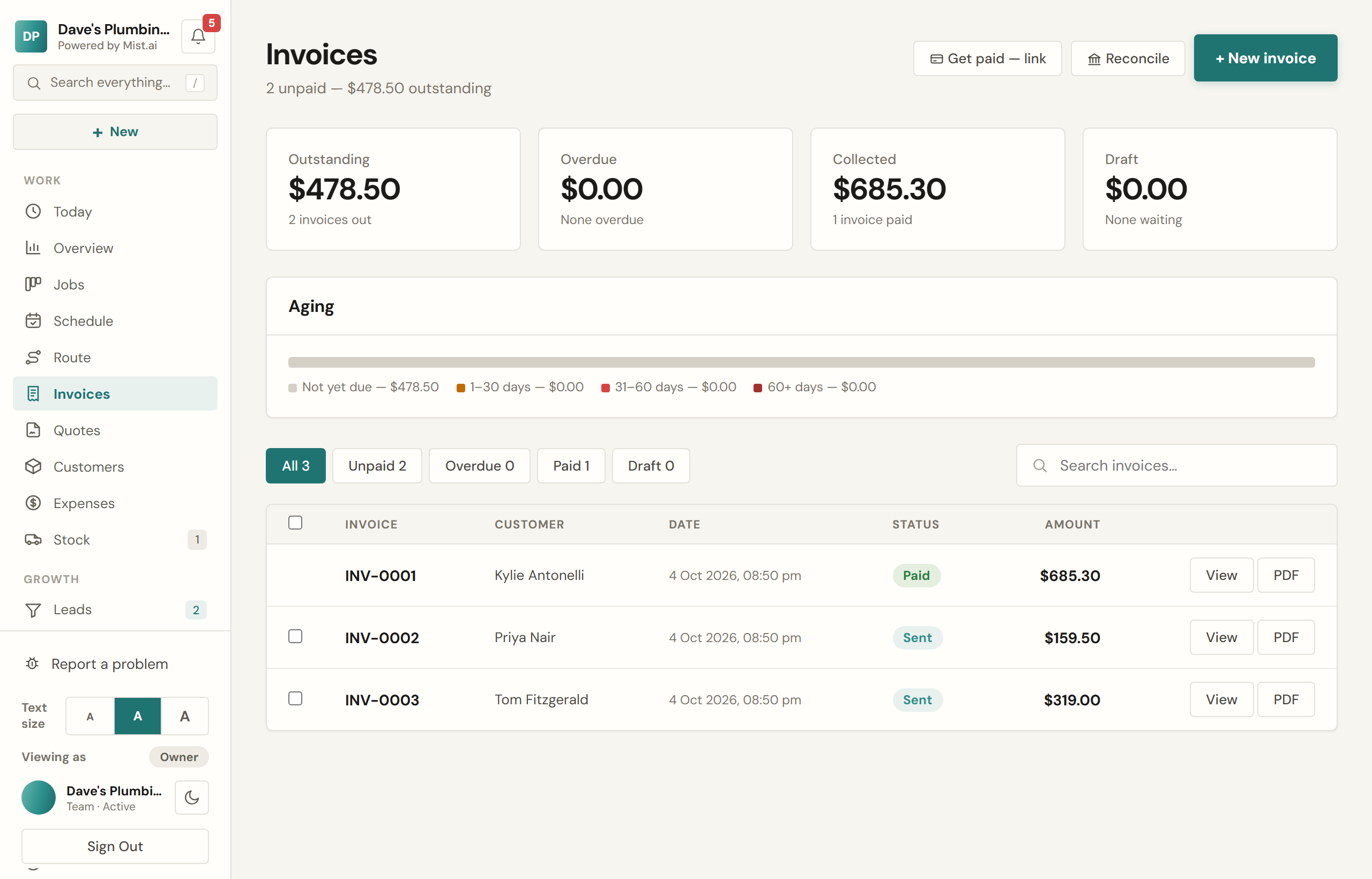
The Invoices page opens with what is outstanding, split by how late it is — current, 1-30 days, 31-60, 61-90, over 90. Statements for a single customer print every outstanding invoice on one page with a running balance. Pro and up
Matching bank deposits Pro and up
Paid mostly by bank transfer? On Invoices, press Reconcile and drop in a CSV of transactions from your internet banking. Mist matches each deposit to an unpaid invoice, first by the invoice number in the description, then by exact amount. Check the ticks and press Record selected. Each payment is recorded on the day the bank shows.
- A deposit for what is owed marks the invoice paid.
- A smaller one is recorded as a part-payment, and the rest stays owing. Mist does not chase an invoice once a part-payment is recorded on it.
- A larger one marks the invoice paid for what was owed, only if you tick it.
- A deposit already recorded is never offered again, so importing the same statement twice does not pay anything twice.
Refunds
A card payment taken through Mist can be refunded in full or in part from the invoice, with a reason. Stripe keeps its card fee on a refunded payment; Mist gives back its 0.5% on the amount refunded. Payments taken by bank transfer or cash are refunded your own way — Mist will not pretend to reverse money it never handled.