The AI receptionist
How the chat widget answers, what it knows, and how it books real slots in your diary.
The widget sits in the corner of your website and answers enquiries at any hour. It is a conversation rather than a menu of buttons, and it identifies itself as an AI assistant so nobody is misled about who they are talking to.
Putting it on your website
Connections → Show me how (also on the Set up Mist card) gives you your snippet with a Copy button, and the steps for WordPress, Wix, Squarespace or any other site: you paste it once, just before </body>. Not doing it yourself? Email this to my web person sends whoever looks after your website your note, the snippet and the steps for every platform, under your business name. Nothing else about your account goes with it.
The screen changes to Installed, with when the chat was last seen on your site, the first time it loads there. Enquiries from it land in Conversations.
What it knows
Everything it says comes from your own account: your services and prices, your FAQs, your business hours, your service area, and the current time in Perth. It does not browse the web, and it does not make prices up.
- Prices. Where a service carries a rate — per hour, per square metre, per item — it does the arithmetic and gives a figure that starts at your listed price (it is told never to go under a "from" price or your minimum charge), always with the caveat that it is confirmed at the measure or site visit.
- Hours. It knows whether you are open right now, so an after-hours enquiry gets an honest answer about when someone will call back instead of a promise nobody can keep. On a day you have set as closed, it tells customers when you are back and still takes their details.
- Photos. A customer can attach a photo of the problem, and the AI can see it.
- Your area. If they are outside it, it says so early rather than wasting their time.
It books real times
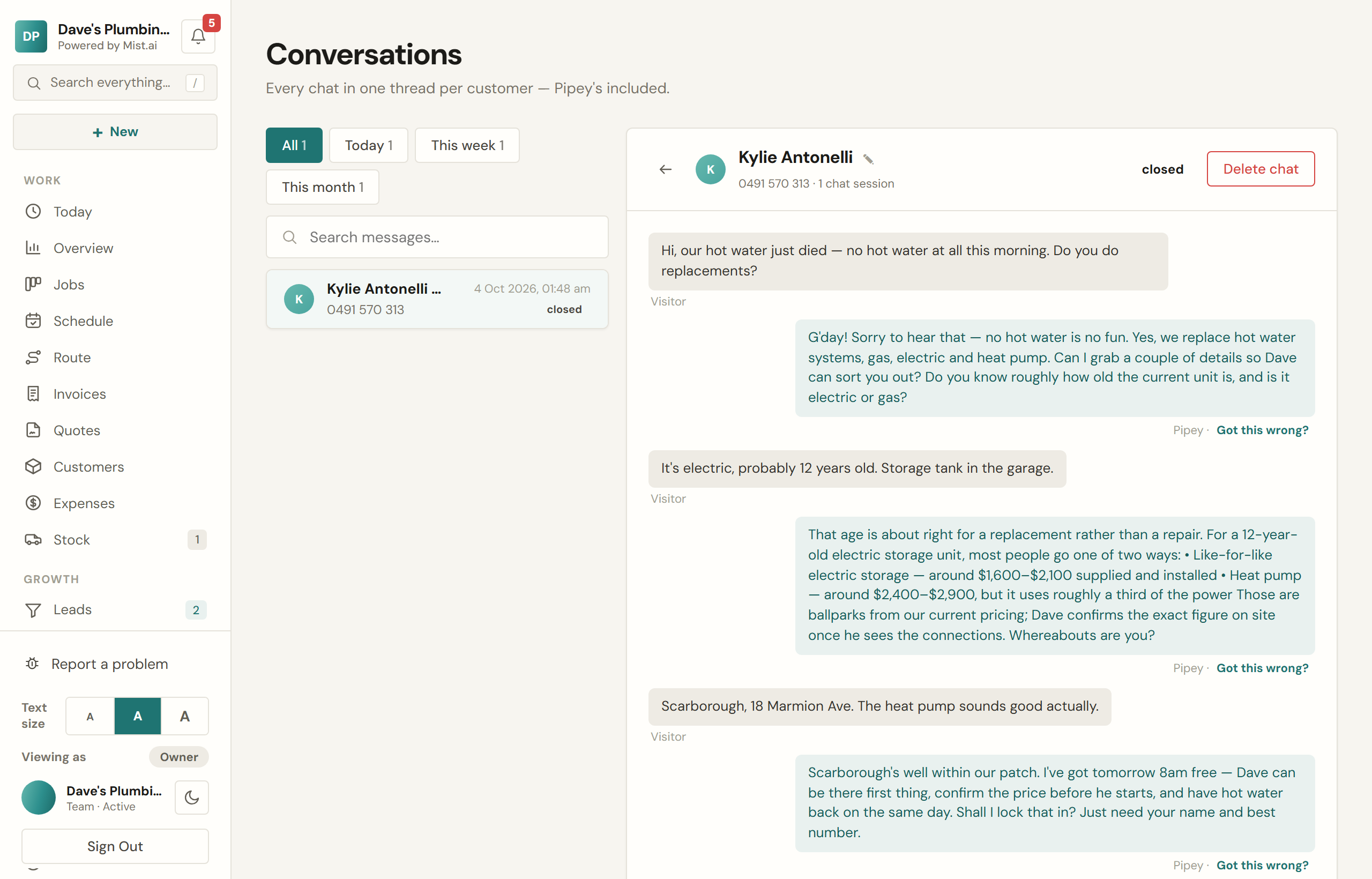
When someone asks for a time, the AI checks your actual diary — your business hours, minus jobs already scheduled and bookings already taken — and offers only windows that are genuinely free. Taking one blocks it immediately, so two customers cannot book the same slot.
Every conversation is kept
Transcripts land in Conversations, grouped by customer, so a repeat customer reads as one thread rather than five. Where an enquiry became a job, the job links back to the conversation it came from.
Phone calls
Mist does not answer your phone with an AI yet, and we will tell you when it is ready rather than sell it to you now. With a Business number, the calls you miss get a short message and a text straight back, and the caller can leave a voice message (the guide to settings, integrations and billing explains it). What works around the clock today is the receptionist on your website, which answers every enquiry, and your booking page, which takes bookings.