Your team
Giving staff a login, deciding what they can see, and where their hours go.
Each person on your team can have their own login. What they can do is up to you, right by right, and a change takes effect on their next tap, not at some later expiry.
Adding a person
On Team, press Invite someone (Add someone while it is just you). It takes three steps: who they are (name, role, email and mobile), where they start from, and a check of their rights. Then Invite to log in Pro and up emails them a link to set their password, which works for 7 days. A staff login needs a plan with logins; one bookkeeper login is free on every plan. Add without a login puts them on your team so you can put them on jobs, with no login made and nothing sent.
Where they start
Each person starts from a ready-made set of rights, and you can change any right after, except on a bookkeeper login:
- Office manager. Runs the diary, the office and the team's week.
- Sales rep. Measures, quotes and follows up their own leads.
- Installer. Their own jobs and the price-free work sheet.
- Workshop and stock. Every job, the price-free work sheet and the stock list.
- Bookkeeper (money, read-only). Money, read only. Never on a job. One bookkeeper login is free on every plan.
- Everything (like the owner). Every right, for a second director. Billing, the account and who can do what stay with you.
Anyone on your team before these starts arrived keeps what they had, shown as Full access, Assigned only or Accountant (money, read-only), until you change it.
Who can do what
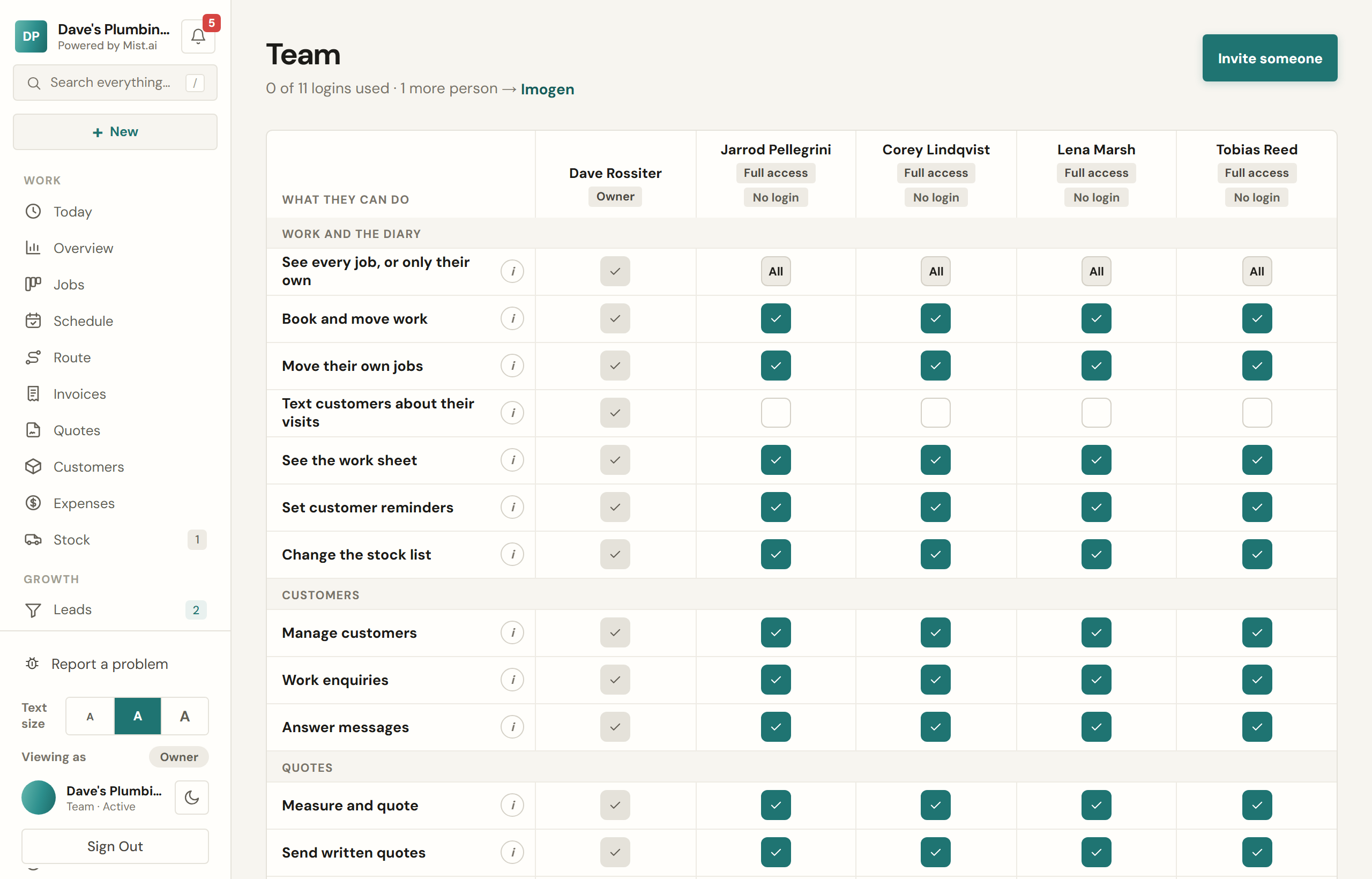
Open someone on Team to see every right they hold, in five groups: Work and the diary, Customers, Quotes, Money and The business. Switch any one on or off. Their label then reads Custom, based on where they started, and Go back to undoes your changes. On a computer, the table shows everyone side by side.
Two switches ask you first, because they open money: See money and prices and Charge cards and refund. Some rights need another on first: Text customers about their visits needs See every job, for one.
Only you change what someone can do, and only you give someone a login. Someone you let manage the team can add people and edit their details, but everyone they add starts on Assigned only until you change it.
Your staff see their own rights under What I can do in their menu, and the menu shows them only the screens their rights open.
Text customers about their visits lets someone answer "Let them know?" when they book, move or cancel a visit, and text or email the customer. It is off until you switch it on, on every start but Everything (like the owner).
Handing out work
Assign a job, a booking or a lead to someone and they are told. Their initials show on the card so a glance at the board tells you who has what. A small dot on a person's initials means they have not opened it yet.
A job can have more than one person on it. Pick one lead, then add anyone else who will be on site under "Also on it" — on a phone, tap Change beside the names on the job. Everyone on the job sees it on their Today, can clock on, add photos, tick the checklist, log an expense and text the customer that they are on the way. Someone who is not on it cannot see it, and a bookkeeper login cannot be put on a job.
The people on a job are told when they are put on it, and when it is booked in, moved, taken off the diary or cancelled, or they are taken off it — never about a change they made themselves, and never with a price. It comes by email, and by text too for anyone who switches Text on in their My alerts.
Hours
Clocking on and off builds a timesheet per person per week. As the owner you see everyone's, week by week, and can approve a week once you are happy with it. There is a CSV for payroll.
Seats
How many people can have a login depends on your plan. Team shows how many are in use. Once every login your plan includes is taken, the owner can add an extra one from Team on the web portal: it is charged from the day you add it, then each month on your bill. Added in your free trial, nothing is charged that day: it is first billed with your first bill. A paid login nobody is using can be taken off the same way; it ends that day, and the unused days come off your next bill. Removing someone from Team takes a paid login off too, once one is no longer needed, and the dialog says so before you confirm.